GBA games style Sway-WM Configuration: Waybar

Waybar’s inspiration is Metroid: mostly Metroid Fusion, but also Metroid: Zero Mission. The configuration consists of two files: the modules.json file, which lists the modules used, and the style.css file, which handles the appearance of the bar.

1.1 MODULES
The modules used are purely personal. It’s not the first time I've used Waybar, so I copied most of the modules from my previous configuration. I like to use Waybar as a quick shortcut to the services and apps I need, even the ones I rarely use.
However, in some cases, I simply assign specific keybindings in my Sway config file (for example, slurpshot).
In this configuration, I included Sway-workspaces on the left, date and time in the middle, and several applications on the right, specifically: Bluetooth, a system update script, a screen-recording script (specific for my Gentoo Sway configuration), volume control, network panel, battery, and a poweroff button.
Workspaces are essential for me because I use my laptop for many different tasks, so keeping everything organized helps with multitasking.
While I find this specific configuration of workspaces pretty functional, I still think I could optimize it more.
While I find this specific configuration of workspaces pretty functional, I still think I could optimize it more.
Regarding the central part of the bar, I’m actually a bit undecided on what module or modules I could be using.
Since everything that I usually use has a space in the bar already, and considering that the date and time module deserves an important spot in the bar, I’m not making any changes for now.
On the right side of the bar, I have several custom scripts that I use to have things running properly with just one click. Some of them are essential, like the Bluetooth, the system updater, and the screen-recording button.
Given that those launch custom scripts, I think it’s useful to explain what they do.
The Bluetooth button activates Bluetooth (duh!) and starts Blue-Tui, a nice terminal-based Bluetooth controller. It’s nice, simple, and lightweight.
The updater button simply launches a series of commands that automate the system updating process.
Finally, the screen-recording button executes some commands that, for the specific Sway and Gentoo configuration, allow some apps like OBS and Discord to record the screen.
Since everything that I usually use has a space in the bar already, and considering that the date and time module deserves an important spot in the bar, I’m not making any changes for now.
On the right side of the bar, I have several custom scripts that I use to have things running properly with just one click. Some of them are essential, like the Bluetooth, the system updater, and the screen-recording button.
Given that those launch custom scripts, I think it’s useful to explain what they do.
The Bluetooth button activates Bluetooth (duh!) and starts Blue-Tui, a nice terminal-based Bluetooth controller. It’s nice, simple, and lightweight.
The updater button simply launches a series of commands that automate the system updating process.
Finally, the screen-recording button executes some commands that, for the specific Sway and Gentoo configuration, allow some apps like OBS and Discord to record the screen.
1.2 STYLING
The colours of the lower bar are inspired by the Metroid: Fusion game selection screen.
In the game, when the slot is not selected, the color of the bar stays grey, but when we switch to the slot where the saved data is, we get the fuchsia colour that I used for the active workspace.
In the game, when the slot is not selected, the color of the bar stays grey, but when we switch to the slot where the saved data is, we get the fuchsia colour that I used for the active workspace.
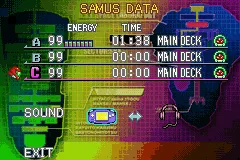


This choice makes the bar look a bit more futuristic, but also a bit retro, considering the strong definition of the rectangular boxes.
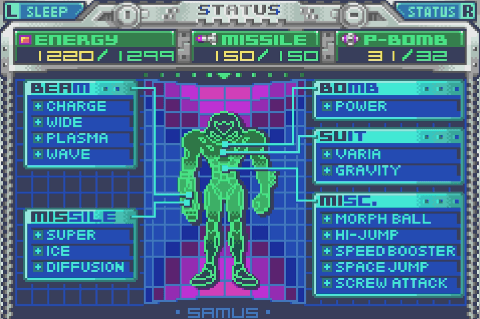

In addition to this, there are alternative states of certain modules, like the network and battery.
By default, both have more than one state: the battery module has three states (normal charge, in charge, and discharge), while the network module has two (connected to the Internet and disconnected).
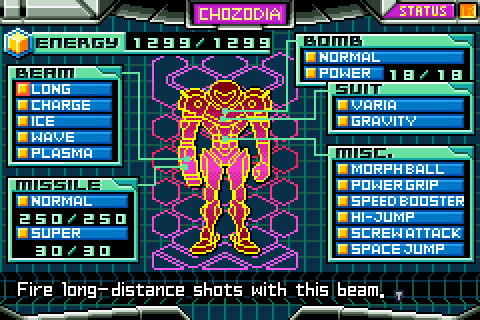
For these additional states (especially the discharged battery state), I took inspiration from the energy bar from the status menu in Metroid: Zero Mission.
I used the green colours for the charging state (light green for the outer box and for the text, darker green for the internal background colour), while for the discharge state, I chose the colors featured in the small square of the energy bar in the game's status menu. The latter one was also used for the additional states of the network and audio modules.
By default, both have more than one state: the battery module has three states (normal charge, in charge, and discharge), while the network module has two (connected to the Internet and disconnected).
For these additional states (especially the discharged battery state), I took inspiration from the energy bar from the status menu in Metroid: Zero Mission.
I used the green colours for the charging state (light green for the outer box and for the text, darker green for the internal background colour), while for the discharge state, I chose the colors featured in the small square of the energy bar in the game's status menu. The latter one was also used for the additional states of the network and audio modules.


Comments
Post a Comment